

New 10 Candid Couple AI Prompts for Authentic Interactions in a City Park
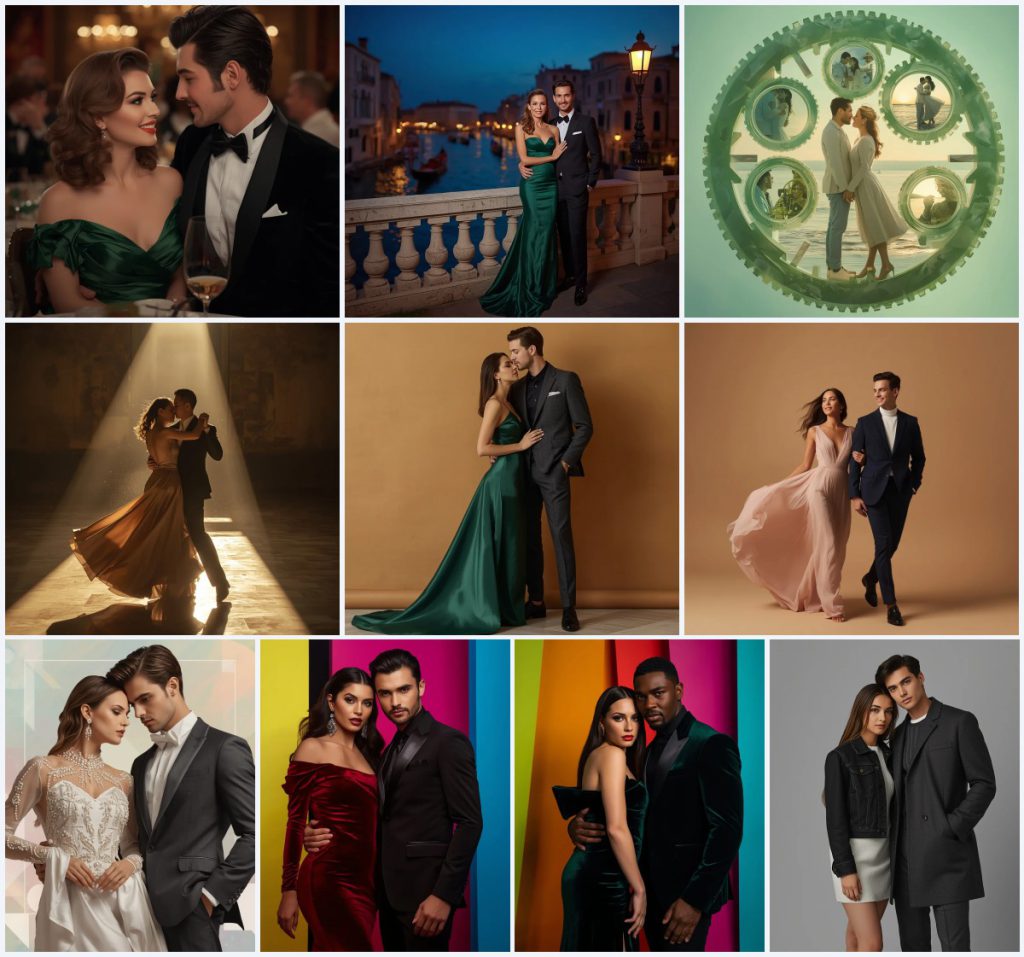
This collection gathers ten couple prompts that aim for authentic, candid interactions rather than stiff studio poses. Each prompt describes a distinct setting, from a luxury evening banquet to a historic Venice bridge, and from a marble ballroom to a minimalist stone wall. The shared thread is a romantic, cinematic mood with high realism, detailed skin textures, and shallow depth of field.
The prompts mix evening wear, silk gowns, velvet suits, and urban denim, so you can pick a scene that fits your reference photo. Some entries are collages, like the jade clockwork mechanism and the harmonized avant garde midnight suits, which layer multiple poses into one frame. Others are single, full-body or mid-shot portraits. This article explains what the prompts ask for, how to run them, and how to fix the usual failures.
What these couple prompts are asking for
These prompts are written for AI image tools that accept text and an optional reference photo. They describe a couple in a specific setting, with clothing, lighting, lens, and resolution clearly stated. The goal is a photorealistic result that looks like a candid moment, not a posed catalog shot. Some prompts, like the jade clockwork collage, ask for multiple poses in one image, while others stay with a single mid-shot or full-body frame.
- A couple in elegant evening wear, such as an emerald green Hollywood glamour dress and a black velvet tuxedo.
- A real location or backdrop, including a luxury banquet hall, a Venice stone bridge, an empty marble ballroom, or a warm stone wall.
- Cinematic lighting, often warm ambient light from chandeliers, street lamps, or a single beam of sunlight through a high window.
- Camera and lens details, such as an 85mm lens, shallow depth of field, and 8K resolution.
- Realistic textures, including extremely detailed skin, crisp fabric draping, and glossy reflections inside jade.
- Candid expressions and poses, like a tender smiling glance, a mid-spin embrace, or a full-body mid-stride walk.
Setting the scene in a city park and beyond
The prompts move between grand and quiet spaces. One asks for a couple sharing a tender, smiling glance in a luxury evening banquet with warm, glowing ambient light from chandeliers. Another places them on a historic stone bridge in Venice during twilight, with gondolas gliding through the canal in the soft-focus background. A third sets them dancing in an empty marble ballroom, captured mid-spin under a single beam of dramatic sunlight piercing through a high window.
Even the studio prompts keep a sense of place. One describes a full-body mid-stride shot against a smooth, warm-toned beige studio wall, while another uses a clean, minimal cold grey background. The collage prompts are more surreal, with a colossal, floating clockwork mechanism where the gears are made entirely of translucent, intricately carved glowing green jade. Across all ten, the setting does the emotional work, so the couple feels like they are inside a real moment.
Why this collection works for candid couple photos
These prompts are useful because they combine a clear visual target with enough variety to match different reference photos. They also avoid the flat, over-smoothed look that many AI portraits fall into. The result is an image that feels like a memory rather than a template.
- The prompts specify lighting and lens details, such as warm chandelier glow or an 85mm lens, which pushes the model toward a cinematic, photographic look.
- They include candid actions, like a mid-spin dance or a full-body mid-stride walk, so the couple does not look frozen or stiff.
- They state realistic textures, including ultra-realistic skin and crisp fabric draping, which helps prevent waxy faces and plastic clothing.
Three styles inside this prompt set
Within this collection you can work in three distinct styles, and each one stays inside the prompt text. You do not need to leave the set to find a different look. Pick the style that matches your reference photo and your editing goal.
- Luxury cinematic evening: This style uses deep emerald green or ruby red velvet gowns, bespoke black tuxedos, and warm ambient light from chandeliers or street lamps.
- Studio high-fashion editorial: This style places the couple against a warm stone wall or a cold grey background, with soft directional lighting and a clean, distraction-free frame.
- Surreal romantic collage: This style layers multiple poses, such as a close-up embrace and a joyful walk on the beach, inside a floating jade clockwork mechanism or a shifting pastel background.
How to run these prompts step by step
The process is the same for each of the ten prompts, whether you choose the Venice bridge scene or the jade clockwork collage. Work in one tool at a time and keep your reference photo ready. The steps below cover the full loop from copy to final check.
- Copy the prompt. Open the prompt you want and copy the full text, including the clothing, lighting, and lens details.
- Upload a reference. Add a clear photo of the couple, ideally with both faces visible and good lighting, so the tool can match features.
- Generate the first pass. Run the prompt once without changes to see how the model handles the scene, pose, and clothing.
- Check hands. Look closely at fingers and hand placement, especially in embrace or mid-spin poses where hands often merge or multiply.
- Check faces. Confirm both faces look natural, with no blur, warping, or mismatched skin tones between the two people.
- Check the main object. Inspect the key object, such as the jade gears, the gondolas, or the chandelier light, and regenerate if it looks broken or generic.
Choosing the right reference photo
A good reference photo does most of the work before the prompt even runs. The prompts ask for detailed skin and fabric, so the input photo should be sharp and well lit. Avoid heavy filters or extreme angles that hide the face.
- Use a photo where both faces are clearly visible and evenly lit, so the tool can read features and expressions.
- Pick a shot with a simple background, since the prompts replace the background with a banquet hall, bridge, or studio wall.
- Choose a full-body or mid-shot frame if you want the clothing details, like the emerald gown or velvet tuxedo, to render correctly.
Tools that handle these couple prompts well
Different tools respond differently to the same prompt. Some are better at text and editing, while others excel at raw realism. The table below lists four common options and what each one is useful for with this specific set.
| Tool | Access | Typical realism | Useful here for |
|---|---|---|---|
| ChatGPT | Web and app, paid tiers for image features | Medium to high, good with instructions | Rewriting the prompt to match a specific scene, such as the Venice stone bridge at twilight. |
| Google Gemini | Web and app, free and paid tiers | Medium to high, strong at scene description | Generating the luxury evening banquet with warm chandelier light and an emerald green gown. |
| Leonardo AI | Web, free credits and paid plans | High, strong textures and lighting | Rendering the jade clockwork collage with glossy sub-surface scattering inside the gears. |
| Midjourney | Discord and web, paid subscription | Very high, cinematic and detailed | Producing the marble ballroom dance with a single beam of sunlight and floating dust particles. |
Tips for cleaner, more believable results
Small changes to the prompt or the reference photo can fix most problems. These tips focus on real materials and objects named in the prompts, so you stay inside the intended look.
- When you want the emerald green Hollywood glamour dress to read clearly, keep the lighting warm and avoid adding extra colors that compete with the green.
- For the jade clockwork mechanism, ask for glossy sub-surface scattering reflections so the translucent gears look like carved gemstone rather than flat green shapes.
- If the velvet tuxedo or ruby red velvet gown looks flat, add a note about crisp fabric draping and subtle metallic lapels to bring back the texture.
Common issues and what to change
Even a strong prompt can fail in predictable ways. The table below lists four issues this set can actually produce and the change that usually fixes them.
| Issue | What to change |
|---|---|
| Faces look waxy or over-smoothed | Add a line asking for ultra-realistic skin textures and natural fabric details, and lower any beauty or smoothing setting. |
| Hands merge or gain extra fingers in the embrace | Simplify the pose in the prompt to a clear mid-shot or full-body stance, then regenerate and check hands before saving. |
| The jade gears look flat and plastic | Reinforce the phrase about glossy sub-surface scattering reflections inside the jade and ask for translucent, intricately carved details. |
| Background crowds out the couple | Reduce background detail, such as gondolas or chandeliers, and keep the focus on the couple with a shallow depth of field. |
Frequently Asked Questions
Can I use these prompts without a reference photo?
Yes, you can run any of the ten prompts as text only. The results will be more generic, and the couple will not resemble real people. Adding a reference photo gives you control over faces, skin tone, and body shape.
Which prompt is best for a city park or outdoor look?
The Venice bridge prompt is the closest to an outdoor, candid feel, with gondolas in the canal and warm street lamps. The marble ballroom and banquet prompts are indoor, while the stone wall and grey background prompts are studio settings.
How do I keep the collage prompts from looking messy?
For the jade clockwork collage, keep the listed poses clear, such as the close-up embrace and the joyful beach walk, and avoid adding more scenes. Ask for a deep pastel gradient background so the layered poses stay readable.
Conclusion
This set of ten prompts gives you a wide range of romantic, cinematic couple scenes, from a luxury evening banquet to a jade clockwork collage. The shared strengths are clear lighting, realistic skin and fabric, and candid poses that feel like a real moment. Start with the scene that matches your reference photo, run it once, and then check hands, faces, and the main object before you refine. With small adjustments, these prompts can produce images that look like a memory rather than a template.
Only edit a photo you have the right to edit, and respect the privacy and consent of everyone in the frame.