
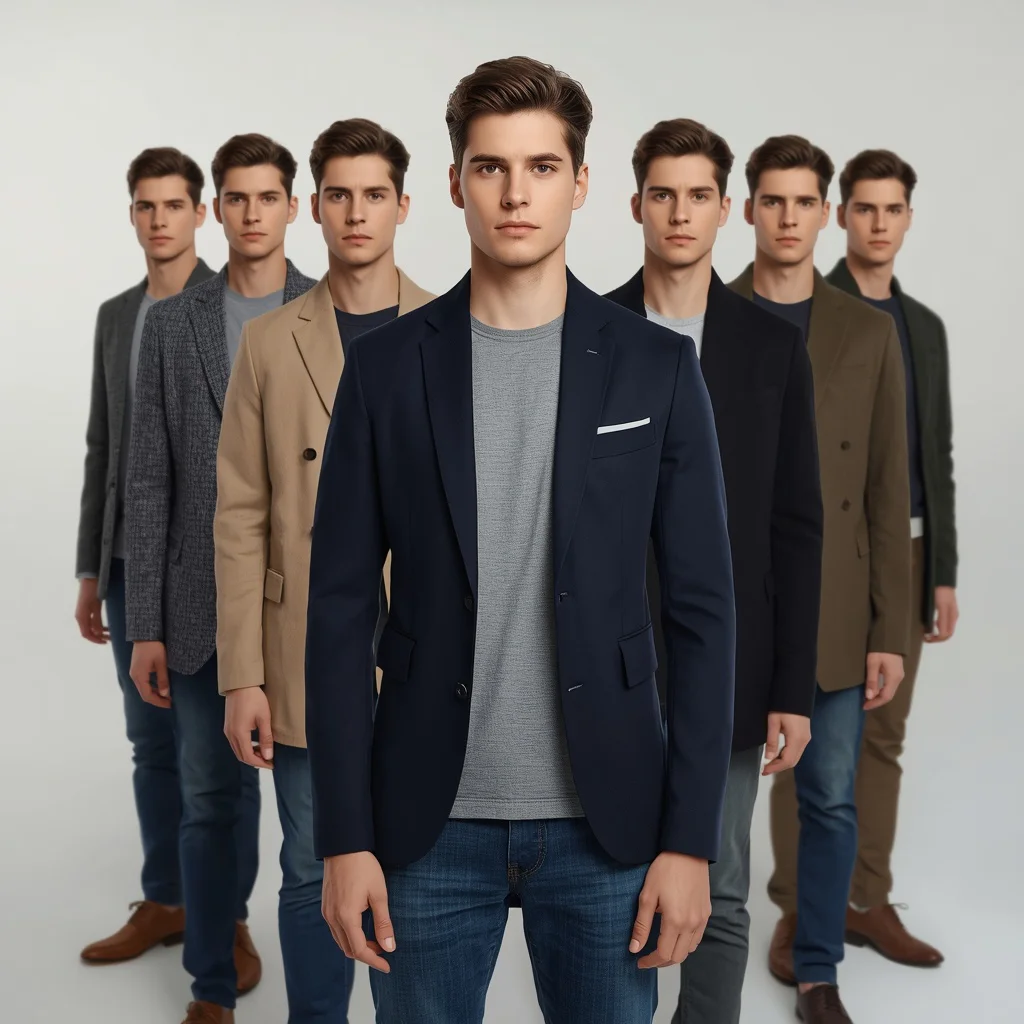
Staggered Lineup Smart Casual Blazers Tailored Male Portrait | Ultra-realistic Studio Lineup
The 'Staggered Lineup Smart Casual Blazers Tailored Male Portrait' prompt combines fashion photography with a conceptual twist. It asks for a single young man to be cloned into eight distinct versions, each wearing a different tailored blazer, all within one clean studio frame.
This setup pushes AI image generators to handle both ultra-realistic human features and complex multi-figure compositions. The result is a striking visual that feels like a high-end editorial spread, perfect for exploring identity, style variations, or simply the art of the modern blazer.
What this staggered blazer portrait prompt is asking for
This prompt instructs the AI to build a highly detailed studio photograph centered on one young man. Around him, seven alternate selves lean into the frame from behind, creating a staggered lineup effect. Each figure wears a distinct blazer, while the central subject anchors the composition with direct eye contact and a neutral expression.
- A young man as the central figure
- A sophisticated navy blue blazer over a grey t-shirt
- Seven alternate versions leaning out from behind in a staggered lineup
- Different blazer styles: charcoal grey tweed, beige linen, black structured, olive green casual
- Confident, neutral expression with direct gaze
- Clean white seamless backdrop and soft studio lighting
The scene this prompt builds
The image places the viewer in a minimalist photography studio. The central young man stands sharply in front, wearing a "sophisticated navy blue blazer over a grey t-shirt," his pose steady and self-assured. Behind him, the lineup unfolds with "seven alternate versions of him lean out from behind in a staggered lineup," creating a sense of depth and playful multiplicity.
The backdrop is described as a "clean white seamless backdrop" that eliminates distractions, while "soft studio lighting" wraps evenly around each figure. The blazers themselves tell a story of variety—from "a charcoal grey tweed blazer" to "an olive green casual blazer"—each adding texture and personality to the cloned subjects.
Why this prompt works for striking AI portraits
This prompt excels because it merges a classic studio portrait setup with a surreal, editorial concept. The clear instructions on clothing, expression, and lighting give the AI a strong foundation, while the staggered lineup introduces controlled complexity. It tests the model's ability to maintain facial consistency across multiple figures and to render fabric textures accurately.
- The contrast between the single central figure and the cloned alternates creates immediate visual interest.
- Detailed blazer descriptions push the AI to generate distinct fabric weaves and colors, from tweed to linen.
- The clean studio setting ensures the focus stays on the human subjects and their varied styling.
Three stylistic approaches for the staggered lineup portrait
This prompt is inherently ultra-realistic, but you can steer its aesthetic while keeping the core composition intact. The three styles below stay within the boundaries of a studio lineup portrait, simply adjusting the mood and finish. Each one reinterprets the blazers and lighting without breaking the original scene.
- High-Fashion Editorial: Push the contrast and add a subtle rim light to make each blazer pop against the white backdrop, giving the lineup a glossy magazine cover feel.
- Film Photography Emulation: Introduce fine grain, slightly muted colors, and a soft vintage tone to make the navy blazer and tweed textures feel like a 35mm film shoot.
- Hyper-Detailed Commercial: Sharpen every thread in the charcoal grey tweed blazer and the beige linen jacket, emphasizing product-photography-level clarity and texture.
How to generate this ultra-realistic studio lineup
Creating this portrait requires careful prompt handling and possibly a reference image for facial consistency. Follow the steps below to get a clean, well-composed result where the central figure and his alternates look like the same person, with correctly rendered hands and faces.
- Copy the full prompt. Take the exact prompt text and paste it into your chosen AI image generator without alterations.
- Upload a reference photo. Provide a clear front-facing portrait of a young man to help the AI maintain consistent facial features across all eight figures.
- Set the aspect ratio. Use a vertical or 4:5 aspect ratio to comfortably fit the staggered lineup without cropping the leaning figures.
- Generate the image. Run the generation and expect an ultra-realistic output with soft studio lighting and a white seamless background.
- Check the hands. Inspect the hands of the leaning figures; if fingers are fused or distorted, inpaint or regenerate with a negative prompt for bad anatomy.
- Verify each face and blazer. Ensure all seven alternate faces resemble the central subject and that each blazer, like the olive green casual blazer, is distinct.
Choosing the right reference photo
A strong reference photo is crucial for keeping the young man's face identical across all eight positions. The AI uses this image as an anchor for facial structure, expression, and skin tone, especially when multiple figures share the frame.
- Use a well-lit, front-facing portrait with a neutral expression, matching the prompt's confident, direct gaze.
- Avoid heavy shadows or accessories that might confuse the AI when cloning the face onto the alternate figures.
- A plain background in the reference helps the model separate the subject cleanly, making it easier to place him on the white seamless backdrop.
Best AI tools for the staggered blazer portrait
Different AI image generators handle ultra-realism and multi-subject consistency with varying success. The table below compares four popular tools, noting how each one can serve this specific studio lineup prompt.
| Tool | Access | Typical realism | Useful here for |
|---|---|---|---|
| ChatGPT | Web, iOS, Android | High, with photorealism | Generating the overall composition and ensuring the navy blue blazer looks crisp against the white backdrop. |
| Google Gemini | Web, mobile | Moderate to high | Quickly iterating on blazer colors and styles while keeping the staggered poses intact. |
| Leonardo AI | Web, iOS, Android | Very high with fine-tuning | Using its inpainting tool to fix any distorted hands or mismatched faces among the alternate versions. |
| Midjourney | Discord, web | Excellent for studio lighting | Rendering the soft studio lighting and the texture of the charcoal grey tweed blazer with cinematic quality. |
Three tips to perfect the blazer lineup portrait
Small adjustments can elevate this prompt from a good generation to a flawless one. The tips below focus on real details from the scene, helping you control fabric, lighting, and composition.
- Emphasize the texture of the charcoal grey tweed blazer by adding 'visible weave and flecks' to your prompt, preventing it from looking flat.
- Direct the soft studio lighting to create a gentle shadow on the white backdrop behind the beige linen jacket, adding depth without clutter.
- Use a negative prompt like 'asymmetrical faces, extra limbs, merged bodies' to keep the staggered lineup clean and each figure distinct.
Common issues and fixes for this prompt
Even with a detailed prompt, AI generators can stumble on certain elements. The table below lists typical failures you might encounter and the specific changes to make in your prompt or settings.
| Issue | What to change |
|---|---|
| Faces across the lineup don't match the central subject | Upload a reference image and add 'all eight faces must be identical in structure' to the prompt. |
| Blazer colors bleed into each other or the background | Add 'each blazer color is isolated and distinct, no color bleeding' and increase the contrast setting. |
| Hands or fingers of leaning figures are fused or have six fingers | Include 'perfect hands, five fingers each' in the positive prompt and 'bad anatomy, fused fingers' in the negative prompt. |
| The staggered lineup looks flat, with no depth | Add 'strong depth of field, foreground sharp, background figures slightly out of focus' to create separation. |
Frequently Asked Questions
Can I change the blazer colors in this prompt?
Yes, you can replace the listed blazers—like the charcoal grey tweed or olive green casual blazer—with any colors or fabrics you prefer. Just keep the descriptions detailed so the AI renders each one distinctly.
Why are the alternate faces sometimes different from the central figure?
AI models can struggle with facial consistency across multiple subjects in one image. Using a reference photo and explicitly stating 'all faces must be identical' helps, though some variation may still occur and require inpainting.
What if the soft studio lighting makes the white backdrop look grey?
If the backdrop appears grey, add 'pure white background, no shadows on backdrop' to your prompt. You can also increase the brightness or use a post-generation edit to lift the whites.
Conclusion
The 'Staggered Lineup Smart Casual Blazers Tailored Male Portrait' prompt is a powerful way to explore fashion, identity, and AI's capacity for realistic human replication. By carefully guiding the tool with reference images, precise blazer descriptions, and attention to common pitfalls, you can produce a gallery-worthy image that feels both cohesive and dynamic. Whether you keep it ultra-realistic or push it toward editorial or film styles, the result is a compelling study in modern menswear.
Remember to only use a reference photo you have the legal right to edit and transform for your AI-generated portrait.


